
ERP modernization is one of those decisions that growing companies delay until the cost of not acting becomes obvious.
The close is taking longer every quarter. Reports require manual adjustments before anyone trusts them. An audit request surfaces, and the team spends two weeks reconstructing data that should have taken a few clicks.
At that point, modernization stops being optional. It becomes urgent, and urgency makes it more expensive and more disruptive than it needs to be.
This guide covers what ERP modernization actually means for a growing finance function, when to act, how to choose the right platform, and how to implement without derailing day-to-day operations.
What ERP Modernization Actually Means
ERP modernization is not always a full system replacement. For many companies, it means redesigning how financial data flows across the business, and ensuring systems are configured to support accuracy, controls, and visibility.
That distinction is worth pausing on, because it changes the size of the project. A company whose close is slow because its chart of accounts was never restructured does not need a new platform. It needs the one it has to be configured for how the business operates now. Replacement is the answer when the system genuinely cannot do what's being asked of it, which is a narrower set of cases than most vendors suggest.
A modern finance system should:
- Serve as a single source of truth across accounting, payroll, and reporting
- Reduce manual entry and spreadsheet dependency
- Support audit and compliance requirements cleanly
- Integrate with payroll, HR, billing, and banking
- Scale with headcount, entities, and revenue complexity
The goal is not to install software and move on. The goal is a system that supports how finance actually operates today and at the next stage of growth.
Signs Your Current System Is No Longer Enough
Many companies delay modernization because their system still technically works. But "technically works" and "supports the business well" are not the same thing.
Watch for these signals:
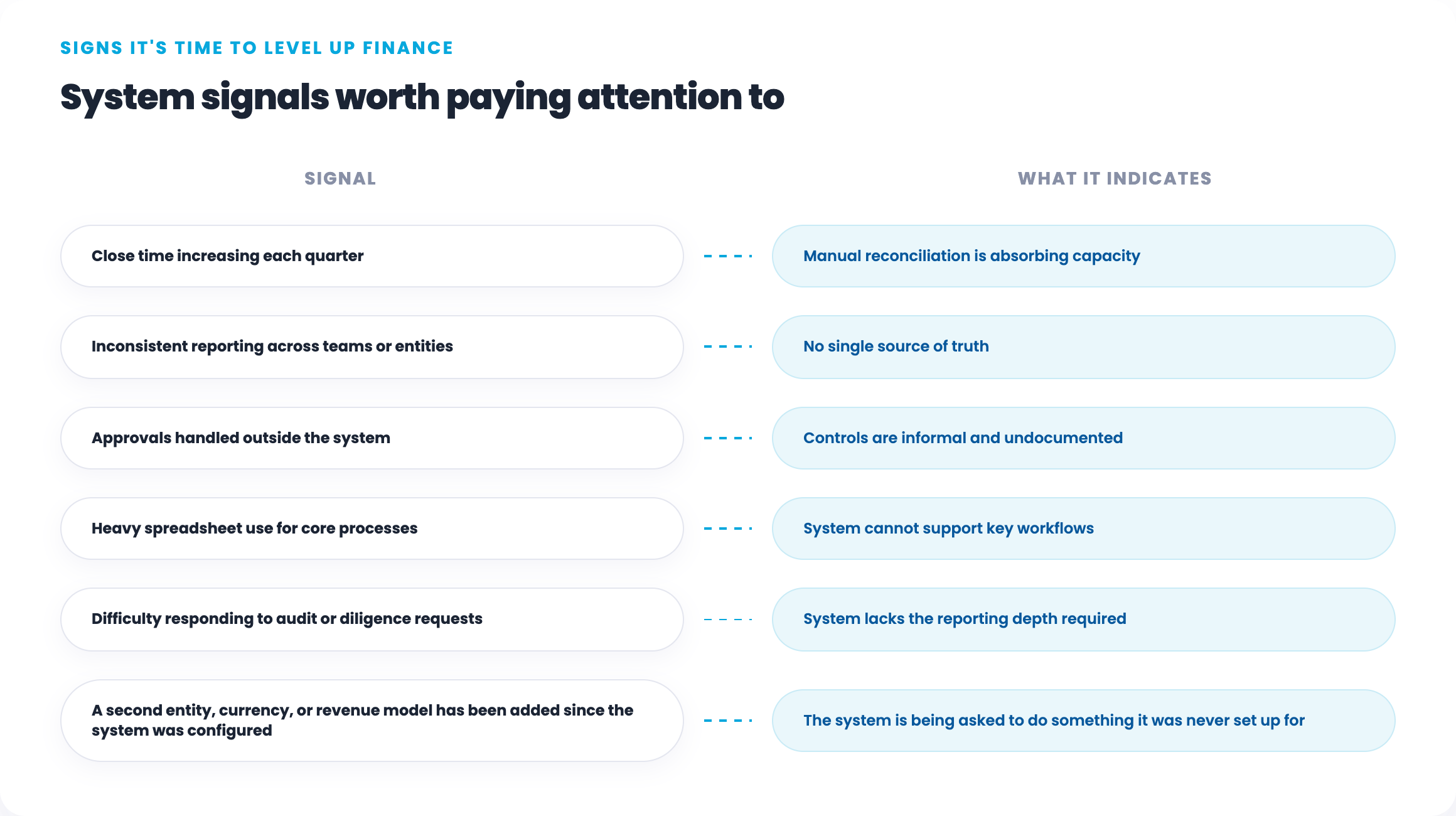
If three or more of these are present, the system is a constraint, not just an inconvenience. These are also common warning signs that financial operations are not scaling more broadly.
ERP Readiness Checklist
Before starting a modernization project, confirm that the organization is ready to do it well.
Process Readiness
- Core financial processes are documented, not just understood informally
- Close steps, ownership, and timelines are defined
- Data inputs from other teams (HR, sales, operations) follow a consistent format
People Readiness
- A finance leader is available to own the project alongside implementation
- Key finance team members have capacity to participate in configuration and testing
- There is executive alignment on timeline, budget, and scope
Data Readiness
- Chart of accounts is reviewed and agreed upon before migration
- Historical data that needs to migrate is identified and cleaned
- Open transactions, balances, and accruals are reconciled and current
Attempting modernization without these in place significantly increases the risk of a failed or stalled implementation.
How to read your results: if you can check all nine, you're ready to start. If you can check six or more, start with the gaps rather than the software. If you can check fewer than six, the readiness work is the project for now, and attempting a platform migration on top of it is how implementations stall.
The most commonly skipped item on this list is the second one under People readiness. Executive alignment on budget is easy to secure. Genuine capacity from the people who will configure and test the system is harder, and its absence is what quietly turns a four-month implementation into a nine-month one.
How to Choose the Right ERP or Finance Platform
There is no universally correct ERP. The right platform depends on company size, complexity, and operating model.
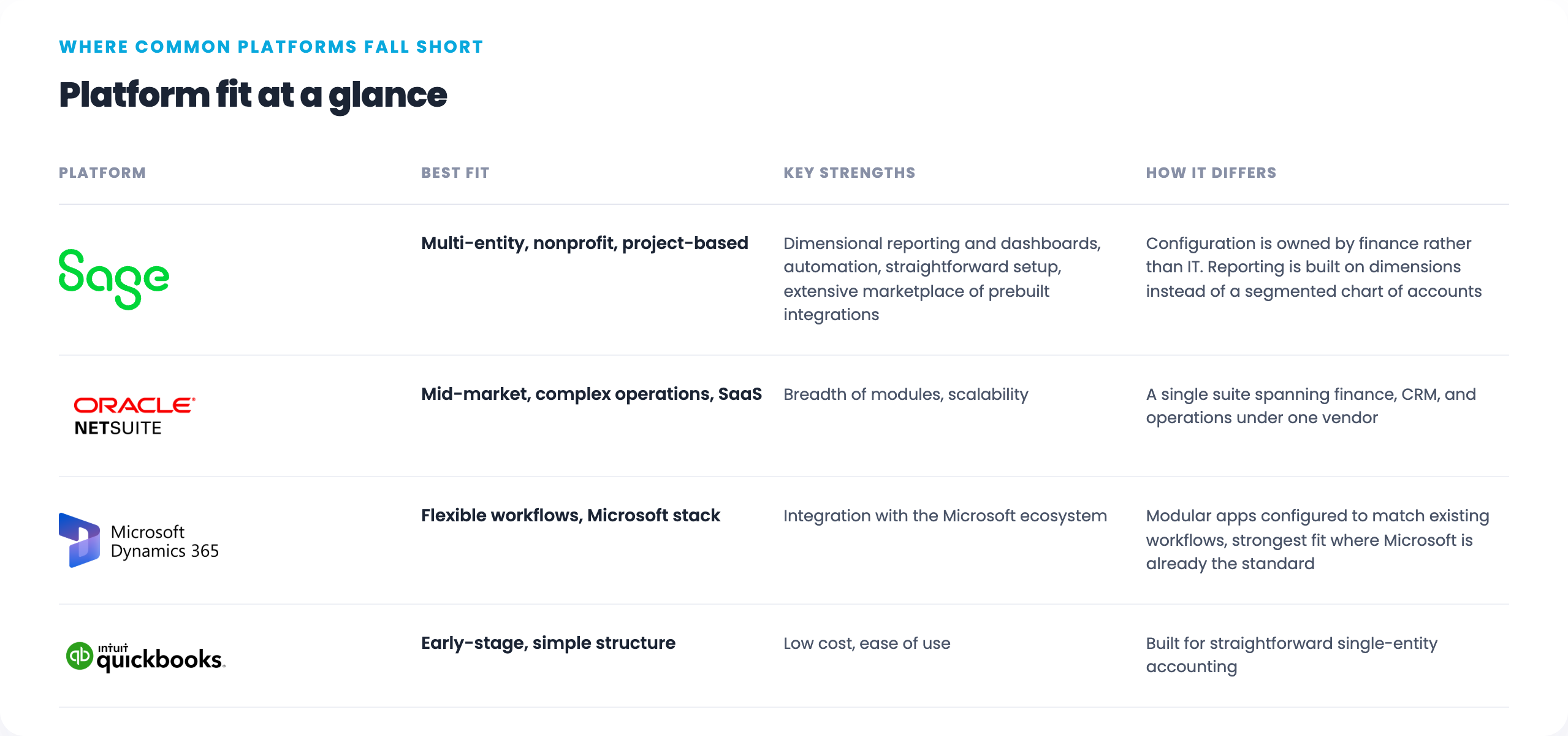
Disclosure: Paid is a Sage partner. A platform recommendation is only useful if it comes with the conditions under which it doesn't apply.
A few principles to guide selection:
- Fit matters more than feature count. A simpler system, used well, outperforms a complex one, used poorly.
- Avoid selecting based on demos alone. Evaluate based on your actual chart of accounts, close process, and reporting requirements.
- Consider a modular finance stack if a single ERP is more than the business currently needs.
- Ask every vendor to demo your own month-end close, not their sample data. The gap between a scripted demo and your actual reconciliation process is where implementations go wrong.
The 7-Step Implementation Approach
Trying to modernize everything at once increases risk and delays value. A phased approach reduces disruption and supports adoption.
Step 1: Assess Current Systems and Processes
Map what exists today. Identify where data is duplicated, manually adjusted, or dependent on spreadsheets. Understand where approvals and controls break down. This prevents rushed decisions and ensures the project addresses real gaps.
Step 2: Define Clear Goals
Vague goals produce vague outcomes. Define specific targets before selecting a platform:
- Target close time (e.g., 5 business days)
- Reporting requirements (entity, department, project level)
- Compliance and audit needs
- Integration requirements with payroll, billing, and HR
Write these down and get them agreed before the first demo. They become your evaluation scorecard, and they are the only defense against selecting features you'll never configure.
Step 3: Select the Platform
Choose based on the goals defined in Step 2, not on brand recognition or vendor pressure. Involve finance, IT, and operations in the evaluation. Prioritize systems that your finance team can configure and maintain without heavy IT dependence.
That last point deserves weight. A platform your controller can adjust without filing a ticket will keep pace with the business. One that requires developer time for a new reporting dimension will slowly drift out of alignment with how the company actually operates. It's a significant part of why Sage Intacct fits lean finance teams well: the dimensional structure is designed to be maintained by finance rather than IT.
Step 4: Phase the Implementation
A typical phased structure:
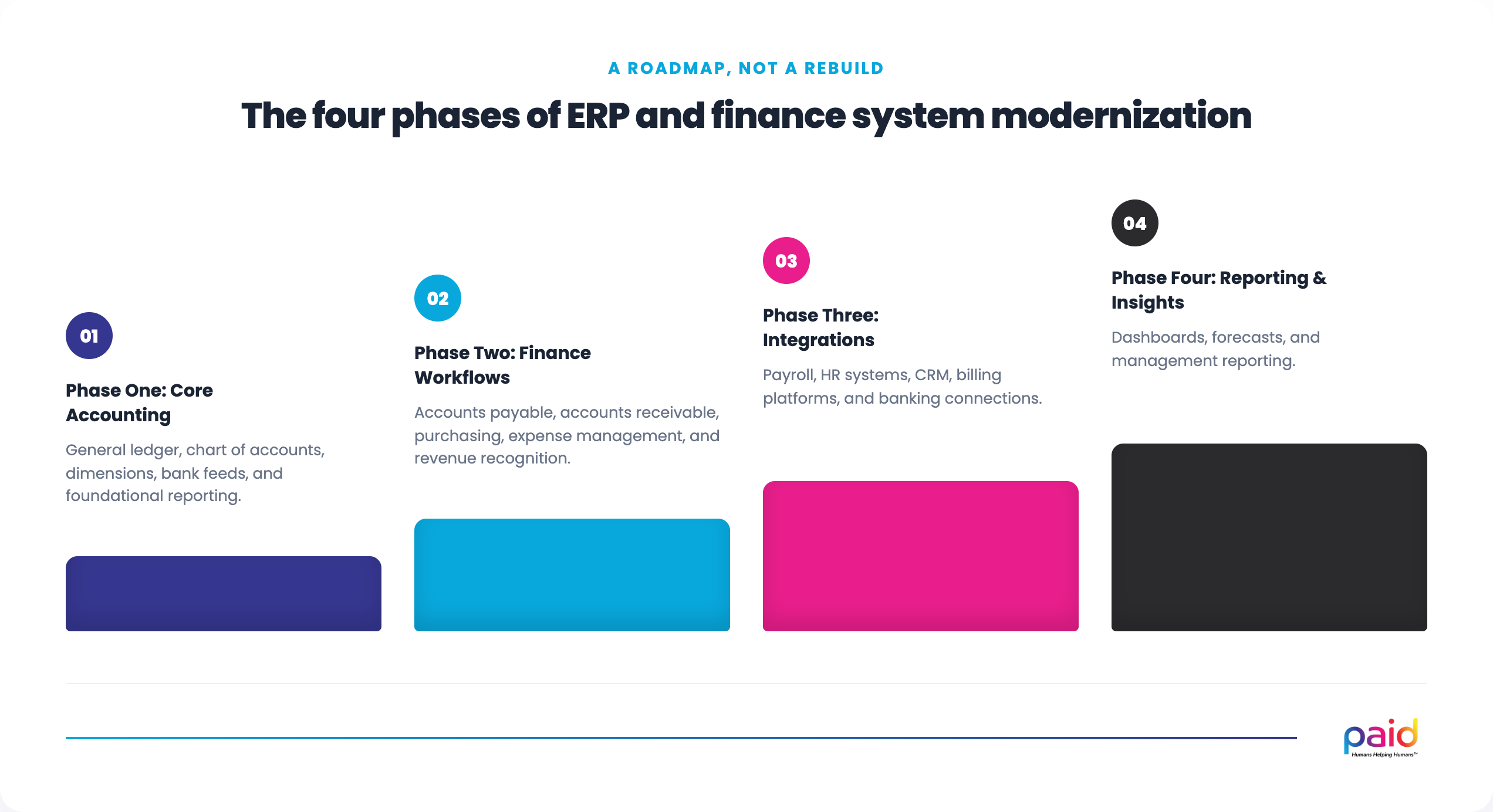
Stabilize each phase before moving to the next. Rushing Phase 2 before Phase 1 is stable is one of the most common ERP implementation mistakes.
The dimensional structure belongs in Phase 1, not Phase 4. Deciding how you want to report by entity, department, location, and project before the first transaction posts is far cheaper than restructuring after a year of data has accumulated under the wrong scheme. This is the single decision in an Intacct implementation that is most expensive to reverse.
Step 5: Configure for Audit and Transaction Readiness
Build audit requirements into the system from the start, not as an afterthought.
This means:
- Entity and department-level reporting configured from day one
- Approval workflows built into the system, not managed via email
- Audit trails that are system-generated, not manually maintained
- Accounting policies documented and reflected in system configuration
This is what makes ERP modernization a direct prerequisite for transaction readiness.
The practical test: if a diligence request arrived next week, could you produce the approval history for any transaction without asking anyone to search their inbox? If the answer is no, the controls are informal regardless of what the policy document says.
Step 6: Stabilize Before Optimizing
After go-live, teams need time to adjust. Most systems settle after one full close cycle.
Resist the urge to add dashboards, advanced reporting, or integrations during stabilization. Let the team build confidence with the core system first. Optimization is more effective once the foundation is stable.
Step 7: Review and Iterate
Once stable, schedule a post-implementation review:
- Is closing time improving?
- Are reports being used without manual adjustment?
- Are integrations running cleanly?
- What gaps surfaced during the first few closes?
Treat the system as a living tool that evolves with the business, not a project that ends at go-live.
What Good ERP Modernization Delivers
When implemented well, ERP modernization produces results that extend beyond the finance team:
- Faster close, because reconciliations are automated and ownership is clear
- Trusted reporting, because data flows consistently without manual intervention
- Stronger controls, because approvals and audit trails are built into the system
- Better planning, because clean data enables reliable forecasts and scenario modeling
- Audit and investor confidence, because the system produces defensible, detailed reporting on demand
It also makes gaps in other areas more visible. Companies that modernize their ERP often discover more clearly when FP&A support is needed because clean data reveals planning limitations that a fragmented system had previously masked.
The Most Common ERP Modernization Mistakes
Knowing what goes wrong helps avoid it:
- Starting with the system instead of the process. If the process is broken, the new system will automate the dysfunction.
- Underestimating data migration complexity. A messy chart of accounts migrated into a new system is still a messy chart of accounts.
- Going live without training. Systems fail in adoption, not in configuration.
- Skipping the stabilization phase. Adding complexity before the core is stable creates compounding problems.
- Treating it as an IT project. ERP modernization is a finance operations project. Finance must own it.
- Treating go-live as the finish line. The implementation partner leaves, and the system gets handed to a team that was already at capacity before it arrived. This is where most of the promised value quietly disappears.
Implementation Is Not the Hard Part. The Year After Is.
Most ERP projects are scoped as a technology engagement with a defined end date. The system gets configured, the team gets trained, the partner rolls off, and the finance team is left to operate a platform they've used for six weeks.
What tends to happen next is predictable. The workarounds start small. A report that's easier to build in Excel. A journal entry that's faster to key manually than to fix at the source. Eighteen months later the company is running spreadsheets alongside a system that was supposed to replace them, and the conclusion is that the platform was the wrong choice.
The platform usually wasn't the problem. Nobody had capacity to operate it well.
Paid is part of Sage Intacct Advisory, helping companies assess, select, and implement Sage Intacct, and we operate in it afterward as part of the ongoing finance function. The same team that configures the system runs the close in it.
We take the same approach across the rest of the finance stack.
Frequently Asked Questions
How long does an ERP implementation take?
It depends far more on data readiness than on the software. A single-entity company with a clean chart of accounts and reconciled balances can be live on core accounting in a matter of weeks. A multi-entity business with unreconciled intercompany balances and a chart of accounts that needs restructuring will spend most of the timeline on preparation before configuration meaningfully starts. The readiness checklist above is the best predictor of your timeline.
Do we need to replace our ERP, or can we fix the one we have?
Ask whether the system is incapable of what you need, or configured badly for it. Slow closes, manual adjustments, and reporting gaps are frequently configuration problems in a system that could handle the requirement. Genuine replacement triggers are structural: multi-entity consolidation the platform can't perform, dimensional reporting it can't support, or revenue recognition complexity beyond its capability.
When should a growing company move from QuickBooks to Sage Intacct?
The usual triggers are a second legal entity, a reporting requirement the chart of accounts has been stretched to fake, revenue recognition complexity, or an upcoming audit or transaction. Headcount and revenue matter less than structural complexity. Companies with a simple structure often run well on QuickBooks past the point where a general benchmark would say to move.
Who should own an ERP implementation?
Finance, not IT. ERP modernization changes how financial processes work, and the decisions that determine whether it succeeds are accounting decisions: chart of accounts structure, dimensional design, approval thresholds, and close ownership. IT should be involved in integration and access, but a project owned by IT tends to optimize for technical delivery rather than for whether the close actually gets faster.
What's the most common reason ERP implementations fail?
Migrating a broken process into a new system. If the close is slow because reconciliations are manual and ownership is unclear, a new platform will make those reconciliations faster to perform without addressing why they're necessary. Process work belongs before configuration, not after go-live.
Is your ERP or finance system slowing the business down?
Paid helps growing companies assess, select, and implement finance systems that support audits, transactions, and long-term growth, without the disruption of a poorly managed implementation. Explore our Cloud ERP and Finance Systems services.